








Building a website used to take weeks. You needed code. You needed coffee. You needed patience. Today, things are different. Tools like Framer made no-code website design fast and fun. But Framer is not the only player in town. There are many great alternatives that help you build beautiful, high-speed websites without touching a single line of code.
TLDR: Framer is great, but it’s not your only option. Tools like Webflow, Wix Studio, Dorik, Carrd, Webstudio, and Editor X offer powerful no-code features. Some focus on design freedom. Some prioritize speed and simplicity. The best choice depends on your goals, skill level, and budget.
Let’s explore six awesome Framer alternatives. We’ll keep it simple. And maybe even fun.
1. Webflow
All Heading
If Framer had a big sibling, it might be Webflow. It’s powerful. Very powerful.
Webflow gives you full design control. You can tweak spacing, animations, interactions, and layouts. It feels like design software. But it builds real websites.
Why people love it:
- Advanced design flexibility
- Built-in CMS
- Strong SEO tools
- Lightning-fast hosting
It’s great for designers who want control without writing code. But it has a learning curve. It’s not the simplest tool on this list.
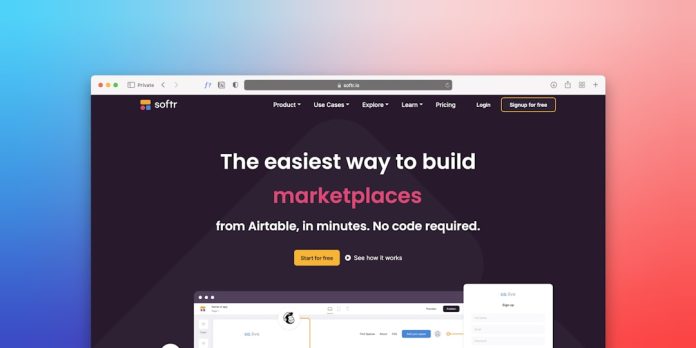
If you like digging into details, Webflow feels like heaven. If you want something super basic, keep reading.
2. Wix Studio
Wix has grown up. A lot.
Wix Studio is their advanced platform. It mixes drag-and-drop simplicity with professional design features.
Standout features:
- Beautiful pre-made templates
- AI design assistance
- Responsive controls
- Strong app marketplace
You can build things quickly. Very quickly. It’s ideal for freelancers and agencies who need client sites fast.
The interface is friendly. You don’t feel overwhelmed. Yet you still have room to customize.
If Webflow feels technical, Wix Studio feels smooth and guided.
3. Dorik
Dorik is simple. Clean. Affordable.
It focuses on landing pages, portfolios, and small business sites. If you want speed and minimal fuss, Dorik shines.
Why Dorik stands out:
- Very beginner-friendly
- Affordable pricing
- Built-in memberships
- White-label option for agencies
The builder is lightweight. It loads fast. Pages publish fast too.
It may not have the depth of Webflow. But it doesn’t try to. It focuses on doing simple things very well.
4. Carrd
Carrd is tiny. And that’s the point.
It creates beautiful one-page websites. That’s its superpower.
Need a personal profile? A waitlist page? A quick product promo page? Carrd nails it.
What makes Carrd awesome:
- Extremely affordable
- Super easy to use
- Fast setup
- Clean minimal templates
You won’t build a massive corporate website with Carrd. But that’s okay. It’s perfect for creators, freelancers, and side projects.
Sometimes simple wins.
5. Webstudio
Webstudio is newer. But it’s gaining attention fast.
It feels similar to Webflow. But it leans into being more open and flexible.
Why developers and tech-savvy designers like it:
- Open-source foundation
- No forced hosting lock-in
- Visual CSS control
- Strong performance focus
If you care about clean code output, Webstudio is exciting.
It’s not as beginner-focused as Wix or Dorik. But if you enjoy understanding how websites work under the hood, this is a fun choice.
6. Editor X
Editor X was built for responsive design lovers.
It gives you fine control over how your website behaves on different screen sizes. Desktop. Tablet. Mobile. You choose how each looks.
Core strengths:
- Advanced responsive layout tools
- Flexbox-style control
- Custom breakpoints
- Strong CMS features

It bridges the gap between design freedom and ease of use. Great for agencies. Great for advanced freelancers.
Quick Comparison Chart
| Tool | Best For | Ease of Use | Design Freedom | Pricing |
|---|---|---|---|---|
| Webflow | Professional designers | Medium | Very High | Mid to High |
| Wix Studio | Freelancers and agencies | Easy to Medium | High | Mid |
| Dorik | Small businesses | Very Easy | Medium | Affordable |
| Carrd | One-page sites | Extremely Easy | Low to Medium | Very Affordable |
| Webstudio | Tech-savvy users | Medium | High | Varies |
| Editor X | Responsive-focused designers | Medium | Very High | Mid |
How to Choose the Right One
Choosing a tool is not about features alone. It’s about fit.
Ask yourself:
- Do I need advanced animations?
- Am I building a simple landing page?
- Do I care about deep SEO settings?
- Is budget a big concern?
If you want full creative control, go with Webflow or Editor X.
If you want guided simplicity, try Wix Studio or Dorik.
If you want ultra-minimal and fast, pick Carrd.
If you want flexibility and open structure, explore Webstudio.
There is no perfect tool. Only the right tool for your project.
Final Thoughts
Framer is excellent. But competition is strong.
No-code website builders are evolving fast. They are smarter. Faster. Easier to use. And more affordable than ever.
You no longer need to code to build something beautiful. You just need an idea. And the right platform.
Test a few. Play around. Most offer free plans or trials.
Building a website should feel exciting. Not stressful.
Pick your tool. Start building. Launch fast. Improve later.
That’s the magic of modern no-code.





Recent Comments