





Choosing the right podcast recording software can determine whether your show sounds amateur or professional. With audience expectations higher than ever, audio quality, reliability, and workflow efficiency are critical. The best tools combine excellent sound capture, intuitive interfaces, and editing flexibility without overwhelming creators with unnecessary complexity. In this article, we examine three of the best podcast recording software and apps available today, comparing their features, strengths, and ideal use cases.
TLDR: The three best podcast recording software options are Riverside.fm for remote high‑quality recordings, Adobe Audition for professional studio‑grade editing, and Audacity for a powerful free solution. Riverside excels in remote interviews and video podcasts, Adobe Audition offers unmatched precision and audio control, and Audacity provides reliable tools without cost barriers. The best choice depends on your budget, technical skills, and production needs. Each of these tools is trustworthy, widely used, and capable of delivering professional results.
What Makes Great Podcast Recording Software?
All Heading
Before examining each platform, it is important to define what separates professional-grade software from entry-level tools. The best podcast recording apps typically offer:
- High-quality audio capture with support for WAV or lossless formats
- Multi-track recording for better editing control
- Remote recording capabilities for interviews
- Editing tools such as noise reduction, compression, and equalization
- Ease of use with intuitive interfaces
- Export flexibility for various platforms and formats
Depending on whether you are a solo podcaster, part of a remote team, or running a professional studio, your ideal choice will vary.
1. Riverside.fm – Best for Remote Podcast Recording
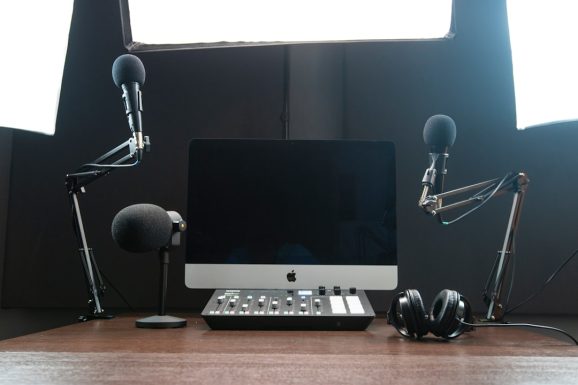
Riverside.fm has quickly become one of the most respected platforms for remote podcast recording. Its defining advantage is its ability to record locally on each participant’s device, even while conducting interviews over the internet. This ensures studio-quality audio regardless of internet disruptions.
Key Features
- Local lossless audio recording (up to 48kHz WAV)
- Separate audio and video tracks for each participant
- Cloud-based workflow
- AI-powered transcription
- Video podcast capability in up to 4K resolution
Why It Stands Out
Traditional video conferencing platforms compress audio and rely heavily on internet strength. Riverside avoids this limitation by recording locally and uploading high-quality files afterward. This approach dramatically improves consistency and reliability, particularly for remote interviews.
Its cloud-based platform also reduces technical barriers. Participants do not need complex setups; they simply access a browser-based studio link. For podcasters conducting regular remote interviews, this convenience is invaluable.
Best For
Interview-based podcasters, video podcasters, and distributed teams.
Potential Drawbacks
- Subscription pricing may not suit hobbyists
- Relies on stable local device performance
- Less advanced editing compared to dedicated DAWs
For professionals working remotely, however, Riverside remains one of the most dependable solutions available.
2. Adobe Audition – Best for Professional Audio Production
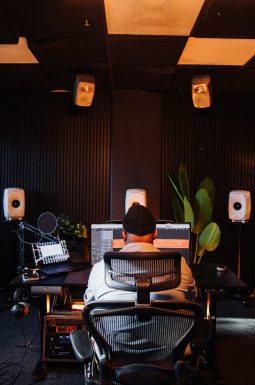
Adobe Audition is considered an industry-standard digital audio workstation (DAW). It is widely used in broadcasting, music production, and high-end podcasting environments. Unlike browser-based tools, Audition is a fully featured editing suite offering extensive precision and control.
Key Features
- Advanced multi-track editing
- Comprehensive noise reduction tools
- Parametric equalizer and compression controls
- Spectral frequency display for detailed repair
- Seamless integration with Adobe Creative Cloud
Why It Stands Out
Adobe Audition’s strength lies in its professional-grade editing capabilities. Users can perform detailed waveform editing, remove subtle background noise, repair clipped audio, and apply layered sound design elements with precision.
The spectral display tool is particularly powerful. It allows editors to visually isolate unwanted sounds, such as coughs or hums, and remove them without affecting surrounding dialogue. This level of control is unmatched by most entry-level software.
Best For
Professional podcasters, audio engineers, and production teams seeking complete control over sound quality.
Potential Drawbacks
- Monthly subscription required
- Steeper learning curve
- May be overly complex for beginners
For users willing to invest time in learning the platform, Adobe Audition offers exceptional audio refinement capabilities that elevate podcast production to broadcast standards.
3. Audacity – Best Free Podcast Recording Software
Audacity has long been one of the most trusted free audio recording tools available. As an open-source platform, it offers remarkable functionality at no cost and runs on Windows, macOS, and Linux systems.
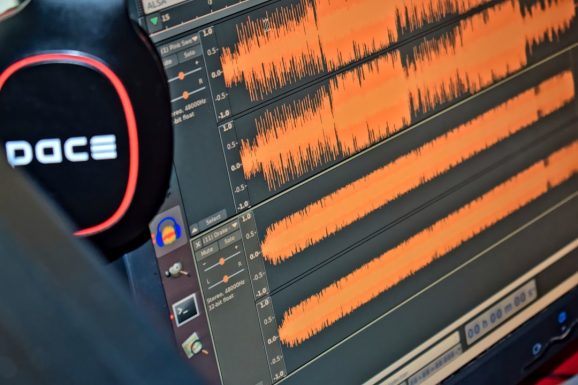
Key Features
- Multi-track recording
- Wide plugin support
- Noise reduction and compression tools
- Open-source customization
- Lightweight installation
Why It Stands Out
Despite being free, Audacity delivers professional-level fundamentals. It allows users to record multiple tracks, apply filters, adjust EQ, and export in high-quality formats. For new podcasters, it removes financial barriers while still enabling solid production standards.
Its community support is extensive, with tutorials and plugins widely available. While the interface may feel dated compared to commercial alternatives, its functionality remains highly respected.
Best For
Beginners, hobbyists, and budget-conscious creators seeking reliable recording tools.
Potential Drawbacks
- Interface is less modern
- No built-in remote interview features
- Limited automated features
For creators starting out or operating with minimal resources, Audacity remains a dependable and effective choice.
Comparison Chart
| Feature | Riverside.fm | Adobe Audition | Audacity |
|---|---|---|---|
| Best For | Remote interviews and video podcasts | Professional audio production | Free recording and editing |
| Price | Subscription-based | Subscription-based | Free |
| Multi-Track Recording | Yes | Yes | Yes |
| Remote Recording | Yes (local recording) | No (external setup required) | No |
| Advanced Editing | Moderate | Extensive | Basic to moderate |
| Ease of Use | High | Moderate | Moderate |
How to Choose the Right Podcast Recording Software
When deciding among these platforms, consider the following:
- Recording environment: If interviewing remotely, Riverside is unmatched.
- Editing requirements: For detailed post-production work, Adobe Audition excels.
- Budget constraints: Audacity provides reliable functionality without cost.
- Technical experience: Beginners may prefer simpler interfaces.
- Growth plans: Consider whether your needs may expand into video or advanced sound design.
Many podcasters combine tools. For example, they may record remote interviews in Riverside and then export the WAV files into Adobe Audition or Audacity for detailed editing. This hybrid workflow ensures both high-quality capture and refined post-production.
Final Thoughts
The podcasting landscape has matured, and audience expectations have followed. Clear, balanced audio builds credibility and keeps listeners engaged. Whether you are conducting remote interviews, producing serialized investigative content, or launching a hobby show, your recording software plays a central role in your success.
Riverside.fm stands out for remote reliability and video integration. Adobe Audition delivers professional-grade production control. Audacity remains the best free, accessible solution for creators starting out.
Each of these platforms is trusted, stable, and widely adopted in the podcasting community. The right choice depends not on which is most popular, but on which aligns with your production goals, technical skill level, and budget. Investing time in learning your chosen software will consistently yield better results than frequently switching tools.
In podcasting, clarity is authority. Selecting the proper recording software is one of the most important decisions you can make to ensure your voice is heard—clearly, professionally, and without compromise.



Recent Comments